The LMS has many capabilities. In my case, the organisation is using Sumtotal TotalLMS. So, I'll be sharing bit by bit on how we can do a learning course design on the LMS itself. Watch this space... I'll be back
Last year, I heard one of my colleague asked me about transferring a video tape, a mini DV actually, in to a DVD. Immediately I reflected upon my days in Melbourne. I actually did that with my mini DV Camcoder after me and the family went out for an outing to the scenic Melbourne and outer Melbourne.
It was a tedious process and requires specific hardware and tools in order to do so. During that time, I used a firewire cable to connect the camcorder with my notebook. I was lucky to have a built in firewire port so I can straight away transfer the video. The transfer process also demands a lot of memory resources and a large disk space. So, RAM is at least 1 GB and free space of at least 40GB. For a PC, a firewire card is required, if not, the video cannot be transferred to the PC.
As for software, Pinnacle Studio is the best! Easy to use and the output is almost professional! The only challenge is that the video transfer will take as long as the video it self. If it is a 60 minutes video, then the transfer will take the same time to be transferred to the disk.
Now, one does not need to have a firewire card. Thanks to USB, we cannow use a USB video capture device. Just like the one that we have in the office. The model name is Pinnacle DVC 150. This is an older model that we have. By using this device, we just need to connect the camcorder to the DVC, then the DVC can be connected directly to a computer or to a VCR or a DVR. One prevalent advantage of using the USB DVC is that the conversion is done in the device it self and not one of our office. Therefore, the computer's resources will not be affected too much during the conversion stage. So, the risk of PC to crash or simply frozen is now reduced.
There are now a lot of USB devices like the Pinnacle DVC. In Lelong.com.my, the termed as usb video grabber.
Wanna know more, I'd be glad to show you how to do it :)
We got a lot of techie good stuff to use, but we fear them even before we even touch or know more about them. Why? Is this a learning issue? Environmental issue? The notion 'we fear what we do not know' highlights one key element in relation to fear. Knowing! Tinker, tinker, tinker...
LOL [means Laughing Out Loud], lets see whether my topic is going to get some discussion here. I first encountered the word baby boomers when I was in Melbourne for my postgrad degree. One of my fellow master candidate talked about the impact on the whole social and economic impact when she and other people are retiring in a few more years. Not to mention that she was made redundant from he job with just a few more years to retirement. Well, she succeeded to survive the storm and now working for Anecdote Australia.
What does the story got to do with the topic, nothing much just an intro. Recently, the word baby boomer that I now hear most of the time is associated to the matters related to usage of technology. Most of the time it was a comparison with the younger generation, namely gen-x and gen-y. And, in this context, baby boomers are associated to their lack of either interest about technology or that they are not interested about technology. Is this a fact? I want to know for sure.
So, as a typical gen-x, I simply hit the keys into the 'crystal ball' called Google, ... tehehe... just kidding, to find some answer. Want to know what I found? Just click on the link below :)
Although there's been a lot of talk over the last decade about the importance of creating technology for Baby Boomers, the conversation has largely focused on the size of their population, their characteristically different behavior than previous generations (throughout their lives) and the amount of disposable income they have available. When working on the Whirlpool in.home project last year, I realized that there was another compelling reason why design for Baby Boomers is important: their familiarity with computer technology.
http://www.orangecone.com/archives/2006/07/baby_boomers_an.html
If the above is not intriguing, try the one below ;)
HDTV Tops Baby Boomers’ Technology Wish List
February 10, 2009 — boomersummit
Baby boomers’ love affair with technology continues and they plan to keep buying new technology.
http://boomersummit.wordpress.com/2009/02/10/hdtv-tops-baby-boomers-technology-wish-list/
Well, baby boomers are really tech savvy after all!
So then, arguments on baby boomers not really keen with technology or dislike technology may not be true...I don't know... maybe a baby boomer can share his/her view...
Besides, I'm a gen-x :)
Have you ever been asked to convert a document to PDF and Adobe Acrobat is not installed in you pc? Do you know how expensive is Adobe Acrobat? It is expensive, seriously.
Unless for those lucky few who bought a scanner or a multifunction printer, then the manufacturer may bundle in Acrobat with the printer. So, many actually turned to the internet and download many of those time limited software that converts their file to PDF. However, these software would stamp words like "This document is converted by something-something" and it does not look nice at all.
So, I stumbled upon an open source tool called PDF Creator that helps me to convert files in to PDF format easily.
It is simple to use, all you need to do, after installing the software, is to use the Print function and select PDFCreator as your intended printer. Then just click Print to proceed.
Here are the step-by step guide on how to use PDF Creator. Cheerio!
- Firstly, very important, download PDF Creator from sourceforge.net here
- Upon completion, install the software.
- Ok, to demonstrate just open any file or website. Select File>Print

- Select PDFCreator as printer, click Print

- A pop up will appear, type in the preferred title for the pdf in the title box

- Then, another pop up will appear asking you to type a file name for your PDF

- Done.


Other references can be found here:
- Pdfcreator official site, http://pdfforge.org/
- “PDFCreator | Open Source Alternative - osalt.com,” http://www.osalt.com/pdfcreator.
My team is on leave, including my IT support. So, it's my time to do the techy workwhereby my colleague Connie usually does it.
One of the TM called me up and mentioned that she can't "register others" for a course, hmmm what was wrong with the batch registrations. So, I went into the role management module and noticed that the under CanManageOtherRegistration, Add to Roster, Remove from Roster and Edit was not selected. So, I experimented first by selecting Edit but TM cannot do batch registrations. So, then I selected on all three and it works!
Click on the image below to view the settings.
Since the LMS is up, the password problem issue suddenly pops up and I'm feeling like I'm back to square one before the systems is enhanced. Well to comfort myself, I can always say that this is normal as we are still in the enhancement mode and there are bound to be teething problem after we put the application to the real production environment.
Well, I intend to talk about the LMS enhancement later in the blog, strictly from a KM perspective.
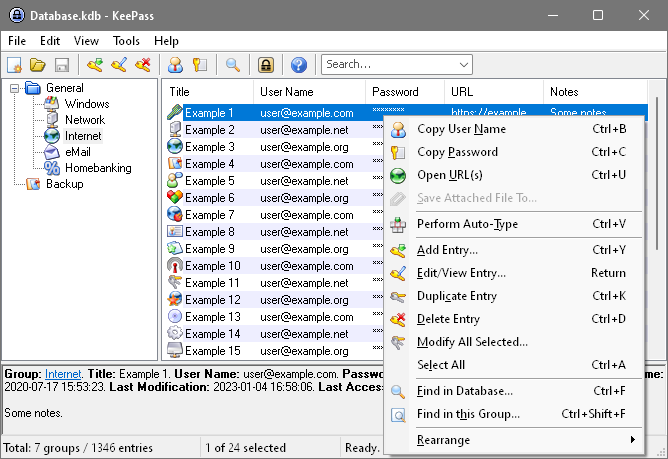
Now, back to the password issue, I've been using this tool called keepass since 2 years ago. Keepass is an open source software, which means that it is free to use :)
The security feature that comes with the tool is something that makes me comfortable using it. The database is well encrypted using the using secure encryption algorithms known as AES and Twofish.
Another feature that makes the tool handy is that it is portable and can be run on even a thumbdrive. This is made possible by creating a key file in a thumbdrive and keepass will refer to it for authentication before accessing the stored password.
If you neeed further info on the tool and how to use it, just go on and visit the site at http://keepass.info, and if you are interested to know more about how u can use applications from your thumbdrive, go to http://portableapps.com/